CASE 02 / PRODUCT DESIGN / HEALTHCARE SaaS
Mind Speak CMS.
Connecting clinical operations across organizations.
I connected headquarters, partners, and clinics through one CMS, spanning institution setup, device service, examination results, privacy, and communications. My work covered operational planning, UX/UI, and frontend implementation.
- OWNERSHIP
- Product planning · IA · UX/UI · Frontend
- COLLABORATION
- Engineering · Hardware · Clinical data
- SCOPE
- 3 roles · 7 operational domains
- PERIOD
- Initial build Sep–Nov 2025 · Follow-up design 2026
Images are Figma designs with sample names and values. Initial work, follow-up design, and drafts are identified separately.
01 / CONTEXT & GOALS
Data managed internally had to become a product others could operate.
The existing tool let internal staff inspect data across products. Expanding Mind Speak to multiple institutions required setup, device support, accounts, and service guidance to become part of the product.
DESIGN QUESTION
Who can act on which institution’s data, and how far?
Seven menus alone would not resolve the workflow. The design needed explicit handoffs and dependencies between roles and records.
Enable independent operations
Extend result requests and delivery into institution-led search, review, and output.
Make service history traceable
Connect current device records to issue handling and replacement history for subsequent support.
Clarify scope and state
Treat role, availability, progress, and disclosure as distinct decisions.
02 / OPERATING MODEL
Three roles. One connected operating model.
Headquarters oversees the product, partners support institutions and devices, and clinics work with patients and examinations. These responsibilities shape navigation and workflows.
This map summarizes representative responsibilities; it is not an exhaustive access-control specification.
Setup depends on relationships, not isolated forms.
- 01Configure an institution
Set the institution, branch, exam, and report types.
- 02Link a device
A registered device is required to generate a center code.
- 03Assign role and affiliation
Use different inputs for clinic and partner accounts.
- 04Activate access
Complete email verification and password change to activate access.
DESIGN DECISIONI made the conditions for starting work visible, beyond required fields. Completing a record and being ready to use the service are different states.
03 / DEVICE LIFECYCLE
A replacement device should not erase the service history.
Installed devices continue through investigation, support, and replacement. I connected current device details, issue handling, and replacement history in one record.
Active / inactive
Whether the device is enabled for use, separate from faults and issue resolution.
Normal / error
Whether a fault exists, supported by serial, MAC, and event logs.
Unresolved · reviewing · on hold · resolved
The progress of handling an issue. These four statuses do not replace device availability.
DESIGN DECISIONEditing a device and replacing it are separate actions. Keeping the reason and previous serial lets the next operator understand the change.
04 / EXAMINATION WORKFLOW
From finding a patient to working with their results.
A patient can accumulate multiple examinations. I distinguished the patient registration ID from each examination ID and connected patient history to reports and brain-activity review.
- 01Find the patient and exam
Narrow the list through search, dates, and starred patients.
- 02Review history
Read examination history alongside patient notes.
- 03Review and edit
Work with Basic/Pro reports, survey scores, and examination notes.
- 04Save and output
Distinguish applying an edit from saving the report, with completion feedback.
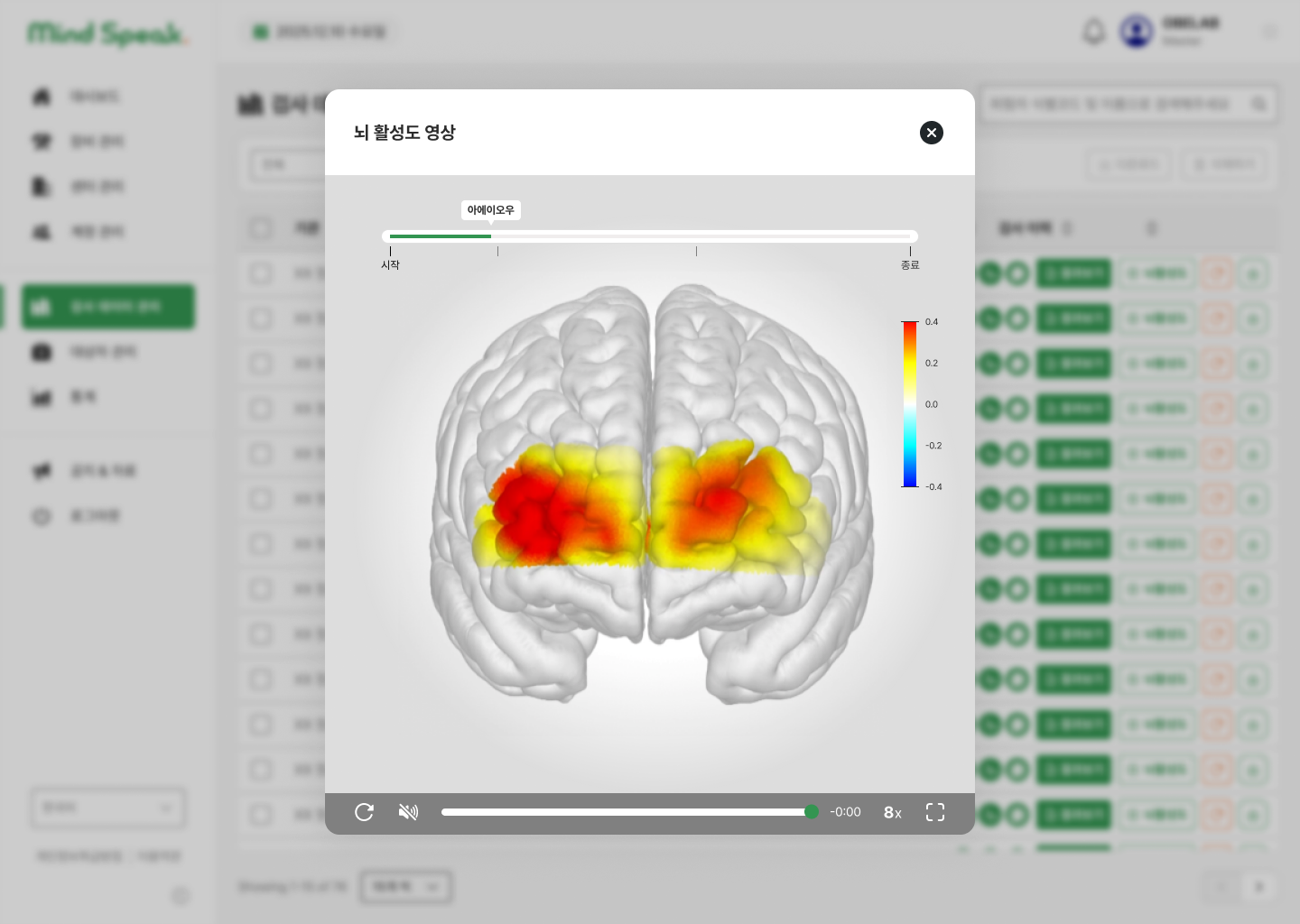
DESIGN DECISIONThe report extends beyond a read-only document. It supports editing scores and notes, applying changes, and confirming they have been saved.
Inspect report editing and save feedback
These state designs include provisional explanatory report copy.
05 / PRIVACY & CONTROL
Balance the need to identify a patient with the need to limit disclosure.
Operators need to identify patients, while screen sharing and report delivery create disclosure risks. I separated default masking, the reveal warning, and report-specific disclosure controls.
| Context | Design rule | Rationale |
|---|---|---|
| Browsing lists | Mask names by default in examination and patient lists | Limit full-name exposure during routine browsing |
| Revealing names | Show a disclosure warning when revealing names | Make the consequence of the action explicit |
| Sharing reports | Apply independent report masking to print and saved output | Avoid carrying a browsing choice automatically into a shared document |
DESIGN DECISIONPrivacy is a decision across browsing, revealing, and output—not a single setting applied to every context.
06 / SERVICE OPERATIONS
Operating the service is part of the product experience.
As the service grows, deciding who receives an update, when, and in which language becomes an operational task. I connected authoring, audience selection, scheduling, notifications, and guidance.
Select the audience
Choose all users, partners, clinics, or specific institutions.
Separate writing from publishing
Use drafts, previews, and immediate or scheduled publication.
Protect consequential actions
Confirm unsaved navigation and missing language content before proceeding.
Inspect unsaved changes, missing languages, and notifications

DESIGN DECISIONI extended the publishing workflow to give operators control over recipients, timing, and situations that could cause incorrect publication or lost work.
07 / CONTINUING THE PRODUCT
Extend discovery and interpretation as data accumulates.
Search and dashboard work remain labeled Draft in Figma. These explorations build on the operating model to clarify search matches and the meaning of operational metrics.
Explain what matched
Expose search categories, match counts, highlighting, and filter reset.
Explain how a metric is counted
Use day, week, and month views with explanatory tooltips and age-by-period distributions.
Validate speed and accuracy
Proposed validation: selecting the correct patient from masked results and interpreting period-based metrics consistently.
Counts in these mockups are sample data, not product outcomes. Release status and usability gains for these drafts are unverified.
08 / DESIGN SYSTEM & DELIVERY
Turn recurring operational rules into reusable UI.
Role-based navigation, input states, and issue statuses became component variants. Owning frontend work alongside planning and UX/UI connected those states to behavior.
Shared structure, role variants
Share the layout while identifying role and affiliation in a consistent location.
From input to completion
Connect fields, dropdowns, tables, pagination, and toasts to workflow states.
Deliver appearance and behavior
Specify activation conditions, replacement history, name disclosure, and save feedback through explicit screen states.
DESIGN DECISIONI defined the operational meaning of recurring UI states alongside their appearance. Consistency also means that the same action communicates the same consequence.
09 / OUTCOME & REFLECTION
A product foundation for institutions to run their own operations.
The initial build connected roles and operational domains. Follow-up design extended privacy, communications, and discovery policies. My contribution spans the operating model, interface, implementation, and exception handling.
Headquarters · partners · clinics
An operating model for different responsibilities
From setup to daily work
Institutions, devices, accounts, exams, patients, statistics, resources
Planning · design · frontend
Operational rules translated into interface and behavior
Next, measure the change in real work.
The available evidence supports design scope and deliverables. Measured time savings and support reductions are not available, so they are not claimed as outcomes. The following is a proposed validation plan.
| Task | Measure | Failure to inspect |
|---|---|---|
| First-time setup | Completion and assistance needed from device linking to activation | Blocked by a missing center code or incomplete verification |
| Find an examination | Correct-report success rate and median task time | Selecting the wrong patient or examination |
| Share a report | Output matching the intended name-disclosure setting | Unintended disclosure from confusing list and report settings |
B2B product quality becomes visible at the handoffs and exceptions.
The design had to cover an institution without a device, an account without verification, and a report shared after revealing a name. The next step is to validate those transitions through role-specific tasks and operational logs.